User guide
Truffle ISLISP is, ofcourse, an ISLISP implementation. The primary resource is the spec (it’s readable and with many examples!). The content here documents specifics of Truffle ISLISP.
See ISLISP reference for reference.
Module system
Truffle ISLISP provides a very simple module system, somewhat inspired by Racket. A module is colloquial to a file that defines its source.
Use (requires path-string …) to load modules; for example
(requires "lib/foo.lisp")Use (provides symbol …) to define module’s exports that will be used by modules that required it; for example
(provides public-function)

(defun public-function () (internal-function)) ;; only this function will be exported
(defun internal-function () "Hello world!")
The module paths are searched relative to sourcepath roots, which defaults to working directory.
You can specify sourcepaths using --islisp.Sourcepath option.
The value must be root paths separated by :.
For example; given the following files
root1/module1.lisp
root2/bar/module2.lisp
main.lisp
Where main.lisp starts with
(requires "module1.lisp" "bar/module2.lisp")The correct invocation is islisp --islisp.SourcePath root1:root2 main.lisp.
Command line arguments
Command line arguments are available through *args\* dynamic variable, as a vector of strings.
Debugging
Truffle provides debugging facilities out of the box. Start launcher with --inspect=port to run in debug mode.
You should see a message: E.g. in Chrome open: devtools://devtools/bundled/js_app.html?ws=127.0.0.1:4242/….
Open the link in chrome, and use standard chrome dev tools to inspect and step around.
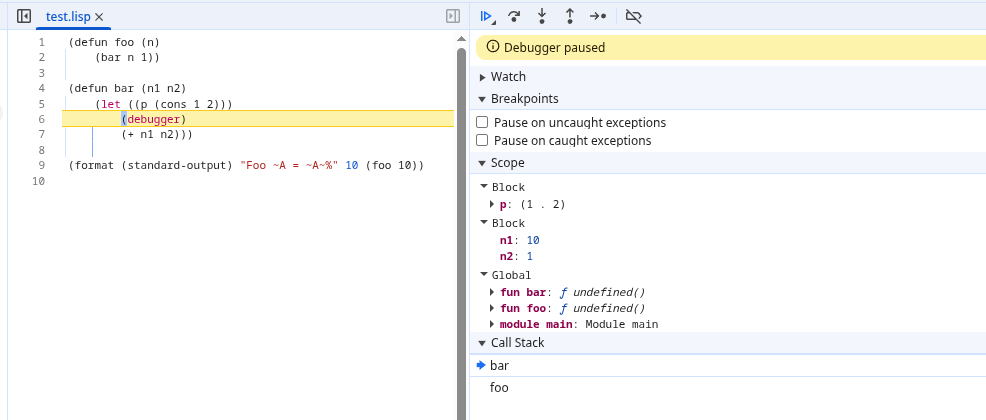
Use (debugger) to setup breakpoints from code.
Additionally, a simple print-style debugging macro trace is provided.
(trace form …) prints expression representation and its value to error stream, and returns the value.
(trace + 1 2) ;; prints "TRACE (+ 1 2) = 3"
Condition stacktraces
Conditions get stacktrace attached upon signalling by default.
Stacktrace gather can be disabled for condition types by implementing method (fill-stacktrace condition-class) and returning nil from it.
Stacktrace can be inspected using generic method (condition-stacktrace condition).
A stacktrace is a vector of elements, where each element is itself a vector.
Element’s vector consists of: source name, start line, start column, end line, end column.
Condition stacktraces are printed during report-condition.
Stacktrace printing can be modified by changing dynamic variable *stacktrace-formatter* and assigning it a formatter function which takes output stream as the first argument, stacktrace as the second, and writes necessary presentation to the stream.
Eval
You can eval any at runtime present truffle language code using (eval language-code source-code); for example
(let ((fun (eval "js" "(function(arg) { return 1 + arg; })")))
  (funcall fun 2)) ;; => 3
interop language’s values are mapped to most fit ISLISP type. For some values, special procedures are given, see Truffle object api.
Truffle object interop API
use (requires "builtin/truffle.lisp") to import following functions.
|
External objects with fields are represented as instances of <truffle-object> class (which is subclass of <object>). You can get a vector of fields (as strings) in a given object using (truffle-object-fields truffle-obj).
(let ((obj (eval "js" "{ a: 1}")))
  (truffle-object-fields obj)) ;; => #("a")
Use (truffle-object-field truffle-obj field) to read a field of a truffle value, where field is a string name of the field.
Use (truffle-object-set-field value truffle-obj field) or (setf (truffle-object-field truffle-obj field) value) to set a field value on a truffle object.
(let ((obj (eval "js" "({ a: 1 })")))
  (truffle-object-field obj "a") ;; => 1
  (setf (truffle-object-field obj "a") 2)
  (truffle-object-field obj "a")) ;; => 2
Interop arrays are presented as objects of class <truffle-vector>. The class extends`<basic-vector>` therefore the common vector / sequence methods can be used.
Interop errors are signalled using <truffle-interop-error> class (which extends <error>). You can retrieve attached message using (truffle-interop-error-message interop-error-condition).
Native function interface
Truffle NFI internal language is provided through transparent interface. First, load the dynamic library using (load-native-library name), which will return an object represented by class <truffle-native-library>. To extract a binding out of the library, call (native-library-symbol symbol-name signature). See truffle documentation regarding details on how to define signature string.
(let* ((lib (load-native-library "libm.so.6"))
       (libm-sin (native-library-symbol lib "sin" "(DOUBLE):DOUBLE")))
  (funcall libm-sin 2.0)) ;; => ~ 0.909